System online // v2.0 // AUTO_KEY_PRESSER.EXE

Auto Key Presser Pro for Windows

The free, open-source automatic keyboard presser that auto-taps or holds any key at a custom interval — toggled from any window with a global hotkey. Built for Roblox anti-AFK, idle-game farming, keeping your PC awake and QA testing. SendInput + scan codes land presses in full-screen games & RDP.
Free Open-source (MIT) No installer ~270 KB No ads / telemetry Windows 10/11 SHA-256 + VirusTotal
STATUS: READY
AKP // MAIN PANEL
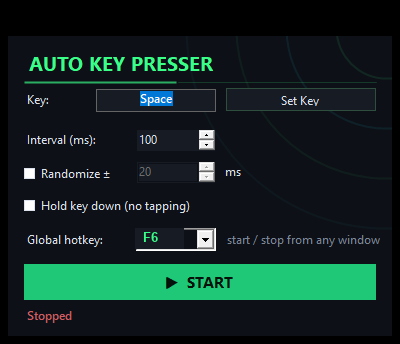
Auto Key Presser Pro app window showing Key Space, interval 100 ms, Hold key down option, global hotkey F6 and a green START button
Glowing green WASD keycaps — the key presser for games brand mark
100%
Free forever
MIT
Open source
~270 KB
Single exe
0 / 0
Ads / telemetry
RDP ✓
Games & VNC
Module 01 // Capabilities

Everything a key presser should do

A focused keyboard auto presser with the controls that matter — nothing bloated, nothing hidden.

FN.01

Any key

Auto-press any keyboard key — letters, numbers, Space, Enter, F-keys, arrows. Set your key in one click with the auto press key picker.

FN.02

Custom interval

Dial the repeat rate from a blistering 5 ms up to 10 minutes. Perfect as a fast auto keyboard clicker or a slow anti-idle tick.

FN.03

Tap or Hold mode

Rapid-tap a key, or flip on Hold to keep a key held down continuously — a true hold key down app and key holder.

🎲
FN.04

Randomized ± timing

Add a random ± jitter to every interval so presses aren't robotically uniform — a more natural cadence for idle automation.

FN.05

Global hotkey (F6)

Start/stop from any window with a rebindable global hotkey, F1–F12, default F6 — no alt-tab out of your game.

🎮
FN.06

Works in games & RDP

Built on SendInput + hardware scan codes, so presses register in full-screen games and RDP/VNC where other tools silently fail.

🌑
FN.07

Modern dark UI

A clean, neon dark interface with everything on one panel. No menus to hunt through, no clutter — just the auto key presser controls.

📦
FN.08

Tiny & portable

A single ~270 KB portable exe. No installer, no dependencies, no registry writes — the whole keyboard auto presser is one file.

🔓
FN.09

Free & open-source

MIT licensed and fully auditable on GitHub. A free open source key presser with zero ads and zero telemetry.

Module 02 // Deployment profiles

Built for the way you play & work

One automatic keyboard presser, four missions.

▸ Profile 01 // Gaming & AFK

Gamers, AFK & idle farming

Stay active without babysitting your keyboard. Run a Roblox anti-AFK key presser to beat the idle-kick, hold W to walk in Minecraft, farm an MMO or incremental game by auto-pressing a skill or attack key, and dodge anti-idle timers. Example: set Key = W, enable Hold, press F6 — done.

anti-afkauto press Wminecraft afk hold Widle game key automationfarming bot keykey presser for games
▸ Profile 02 // Office & presence

Keep your PC awake

Stop sleep, screensavers and away-status. A mouse jiggler alternative that taps a harmless key on an interval to keep PC awake and keep screen on, so you stay "online / green" on Teams, Slack and Discord. Example: set Key = Shift, interval 60 s, Start.

keep pc awakekeep screen onmouse jiggler alternativestay online teams
▸ Profile 03 // QA & developers

Testing, QA & keep-alive

Automate repeated keystrokes for UI and stress testing, hammer an input to reproduce bugs, or keep a session alive during long builds. A dependable repeat key software for Windows that also runs over RDP/VNC. Example: set Key = Enter, interval 200 ms, add ± randomize.

autoclicker for keyboardrepeat key software for WindowsSendInput scan codekeep-alive
▸ Profile 04 // Productivity

Repetitive data entry

Offload the boring stuff. Repeat a key through long forms, spreadsheets or batch chores where the same keystroke fires over and over. A simple macro key presser / spam key tool that just works. Example: set Key = Tab, tune the interval, Start.

macro key presserspam key toolauto keyboard button presserauto key clicker
Module 03 // Interface

A clean HUD for your key presser

Everything on one panel — no digging through menus.

AKP.EXE
Auto key presser app window: Key Space, interval 100 ms, hold key down option, global hotkey F6, green START button, Stopped state

Set the key, interval and hotkey, then hit START.

// Idle · Stopped
AKP.EXE
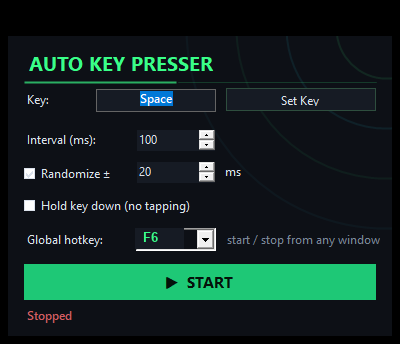
Automatic keyboard presser window in a running configuration with custom interval and randomize timing

Randomize ± timing for a natural, non-uniform cadence.

// Config · Randomize
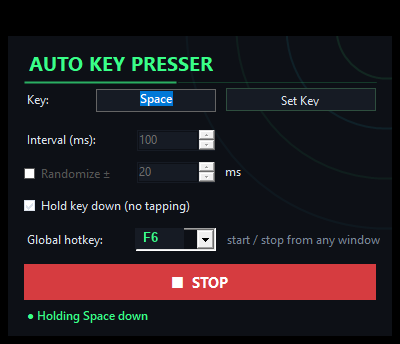
AKP.EXE
Auto keyboard clicker window showing hold key down mode enabled for hold W style automation

Flip on Hold mode to keep a key held down.

// Active · Hold
Module 04 // Boot sequence

Running in under a minute

No install, no config files, no learning curve.

01

Download & unzip

Grab the ~270 KB zip, unzip anywhere and run the portable exe. No installer, no admin rights.

02

Set your key

Click Set Key and pick the key to auto-press — W, Space, Enter, a skill key, anything.

03

Interval or Hold

Dial the interval (5 ms–10 min), add ± randomize, or tick Hold key down for continuous hold.

04

Start (or press F6)

Hit START — or trigger the global hotkey F6 from inside any game or window.

Module 05 // Acquire binary

Download Auto Key Presser Pro

Free forever, open-source, no installer. Just unzip & run — fully portable, leaves no trace on your system.

◆ Verify your download

Every release ships with a published SHA-256 hash and a VirusTotal report. Compare the hash of your zip against the one on the releases page:

certutil -hashfile AutoKeyPresser-v2.0.zip SHA256

Heads-up on antivirus: because any key presser injects keystrokes (SendInput), some engines show a heuristic warning for input-automation tools. This one is fully open source — read the source, verify the hash, or build the exe yourself.

OS Windows 10 / 11 (64-bit) SRC GitHub · MIT SIZE ~270 KB single exe
Module 06 // Knowledge base

Frequently asked questions

Everything about the auto keypresser download, safety and game use.

Q: Is it free?+
Yes — Auto Key Presser Pro is 100% free and open-source under the MIT license. No ads, no telemetry, no upsells, no paid tiers. Download the zip, unzip and run.
Q: Is it safe, and why might antivirus warn?+
It's safe and fully open source. Because every auto keyboard presser injects keystrokes via SendInput, some antivirus engines flag key-injection utilities with a heuristic (not a real detection). You can read the source on GitHub, verify the published SHA-256 hash, check the VirusTotal report, or compile it yourself.
Q: Does it work in games & full-screen (Roblox, Minecraft)?+
Yes. The engine uses SendInput with hardware scan codes, so presses land in full-screen games including Roblox and Minecraft — and even in RDP/VNC sessions where simpler key presser software fails.
Q: Can it hold a key down (hold W)?+
Absolutely. Enable Hold mode to keep a key held down continuously — ideal for minecraft AFK hold W, auto press W to walk, or holding a skill key. Turn it off for rapid tap/spam mode at your chosen interval.
Q: Does it need installation?+
No. It's a single portable ~270 KB exe — no installer, no admin rights, nothing written to your registry. Unzip and run; it's fully portable and leaves no trace.
Q: Which Windows versions are supported?+
Windows 10 and Windows 11 (64-bit). It runs on the .NET Framework already bundled with modern Windows.
Q: Is it open source?+
Yes — the full source is on GitHub under the MIT license. Inspect it, fork it, verify the build, or compile it yourself. It's a genuine free open source key presser.
Q: Can I rebind the global hotkey?+
Yes. The rebindable global hotkey defaults to F6 and can be any key F1–F12. Start and stop the auto key clicker from any window without alt-tabbing out of your game.
Q: Will it get me banned in online games?+
Use it responsibly. Auto Key Presser Pro is built for single-player, idle/AFK, testing/QA and accessibility use, and it makes no attempt to be undetectable. Competitive titles with kernel-level anti-cheat such as Vanguard, EAC or BattlEye prohibit input automation — don't use it there. You are responsible for following each game's terms of service.